- Blog
- Release v2.5.0
Release v2.5.0
January 27, 2026
— Immich Team
Release notes for v2.5.0 — free up space on mobile, database backup and restore (web), 90,000 stars and more!!
Highlights
Happy New Year! Welcome to Immich v2.5.0. This release is our fireworks to celebrate both the new year and reaching 90,000 stars on GitHub. It is packed with major features that have been in the works for quite some time, and the team has kicked off the year with incredible momentum that we're excited to carry forward. We couldn't wait to share this with you. Let's dive right in:
- Free Up Space
- Non-destructive editing
- Database backup and restore (web)
- Foreground upload improvements
- Visual refresh across all platforms
- Disable admin setup
- Star rating (mobile)
- Additional fine-grained permissions (api keys)
- Progressive JPEGs
- Slideshow loop option (web)
- Native HTTP clients for HTTP/2 and HTTP/3 image loading
Free Up Space
This feature was requested ages ago. So long in fact, that it has a 3-digit ID (#165)! Given the rapid iteration and development pace of the pre-stable era, it was risky to include it in the app due to its bulk-delete nature. But it is now 2026 😄, so here we are.
Free Up Space allows you to remove local media files from your device that have already been successfully backed up to your Immich server (and are not in Immich trash). This helps reclaim storage on your mobile device without losing your memories. The feature can be accessed from the user profile panel or from the Settings page in the mobile app.
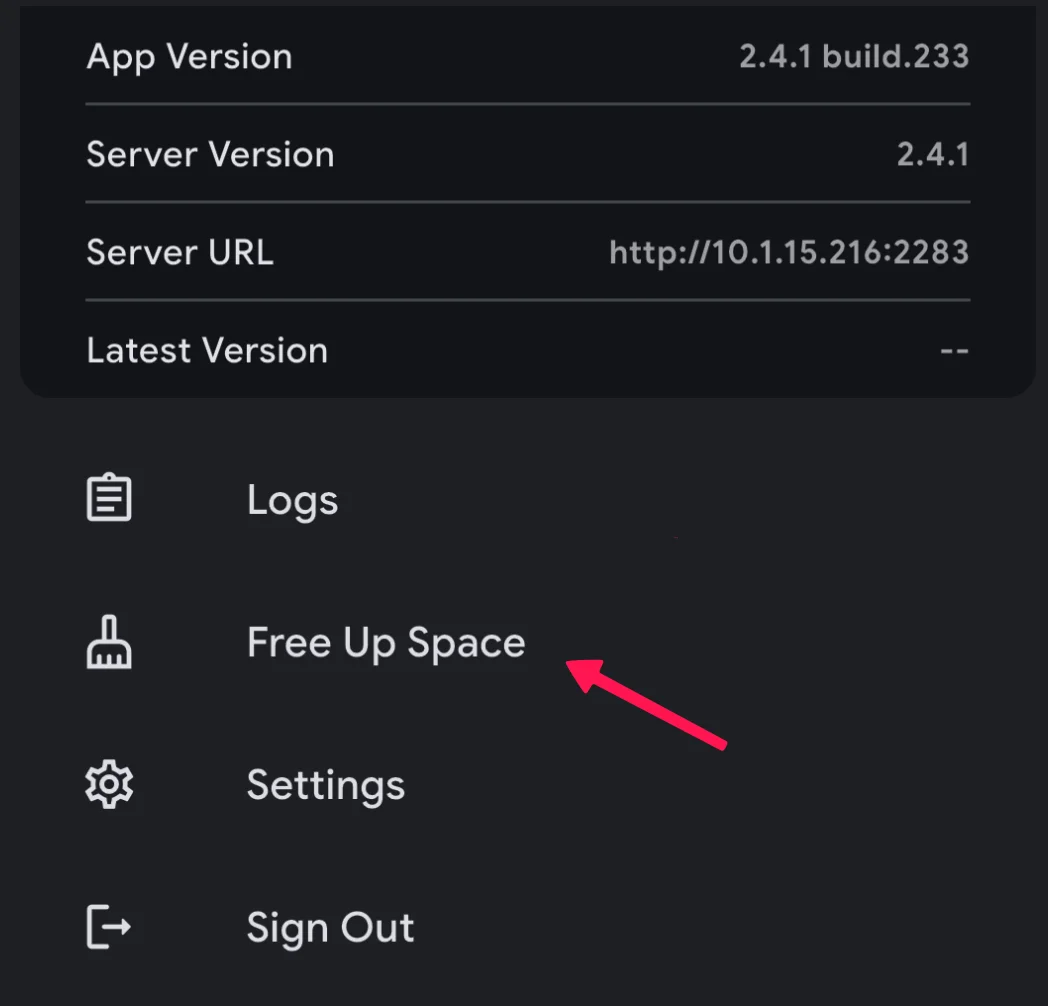
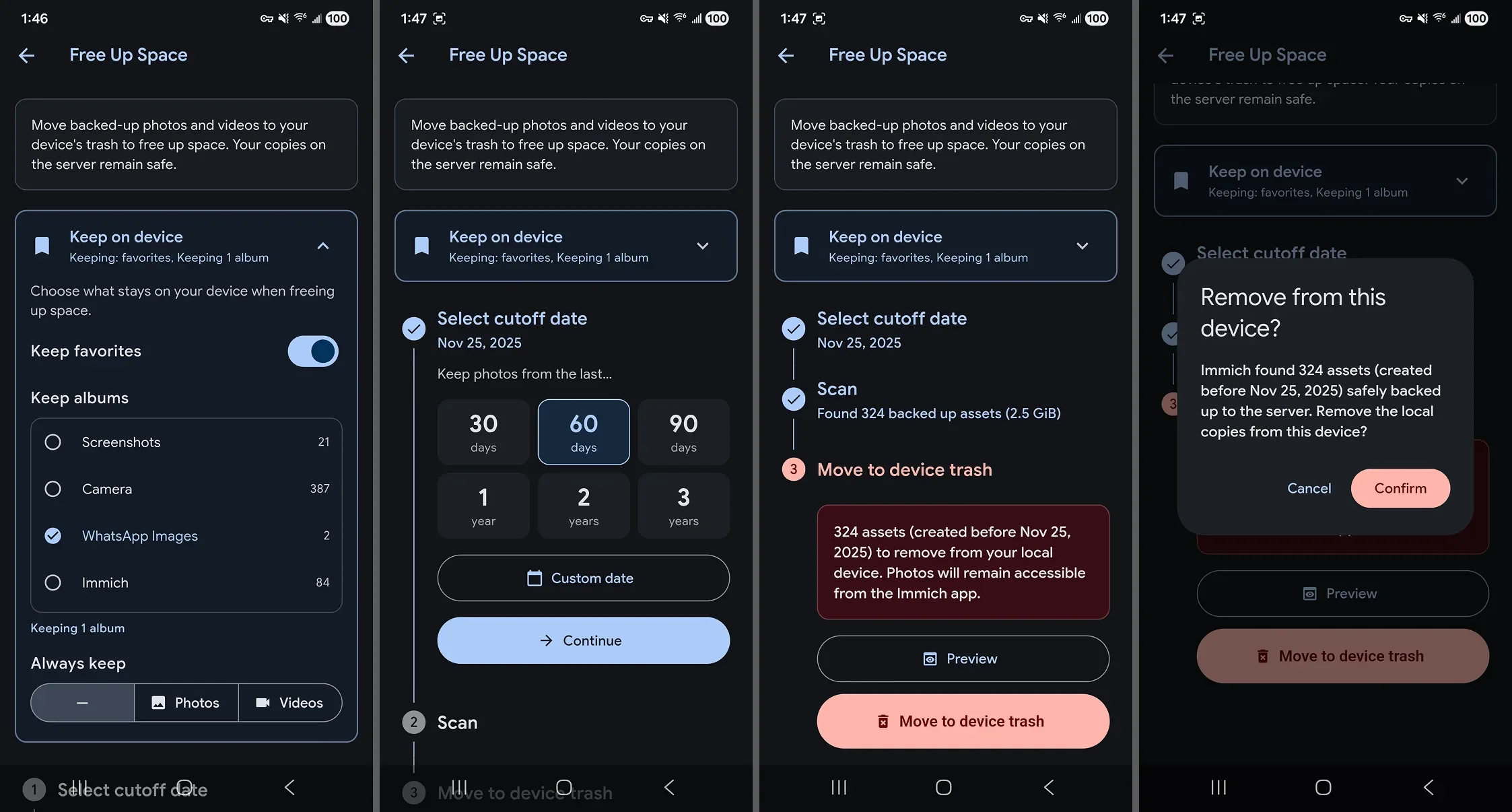
There are configuration options and steps to make sure that everything is verified before deleting from the app.
- Configuration:
- Cutoff date: Free Up Space will only look for photos and videos on or before this date.
- Keep albums: Hold all photos and videos in the selected albums on your device, regardless of other settings. By default,
**WhatsApp**related albums are selected to be kept on the device. Assets that are not already on the device will not be redownloaded. - Keep favorites: This works the same way
**Keep albums**. By default, favorited assets are preserved on your device. - Keep on device: You can choose to restrict removal to
**Always keep**All photos or All videos, regardless of other settings. This setting can hamper freeing up space significantly — with 80 GB of videos and 40 GB of photos, selecting**Always keep photos**retains thousands of photos on your device.
For more information about this feature, please read it here
Non-destructive editing
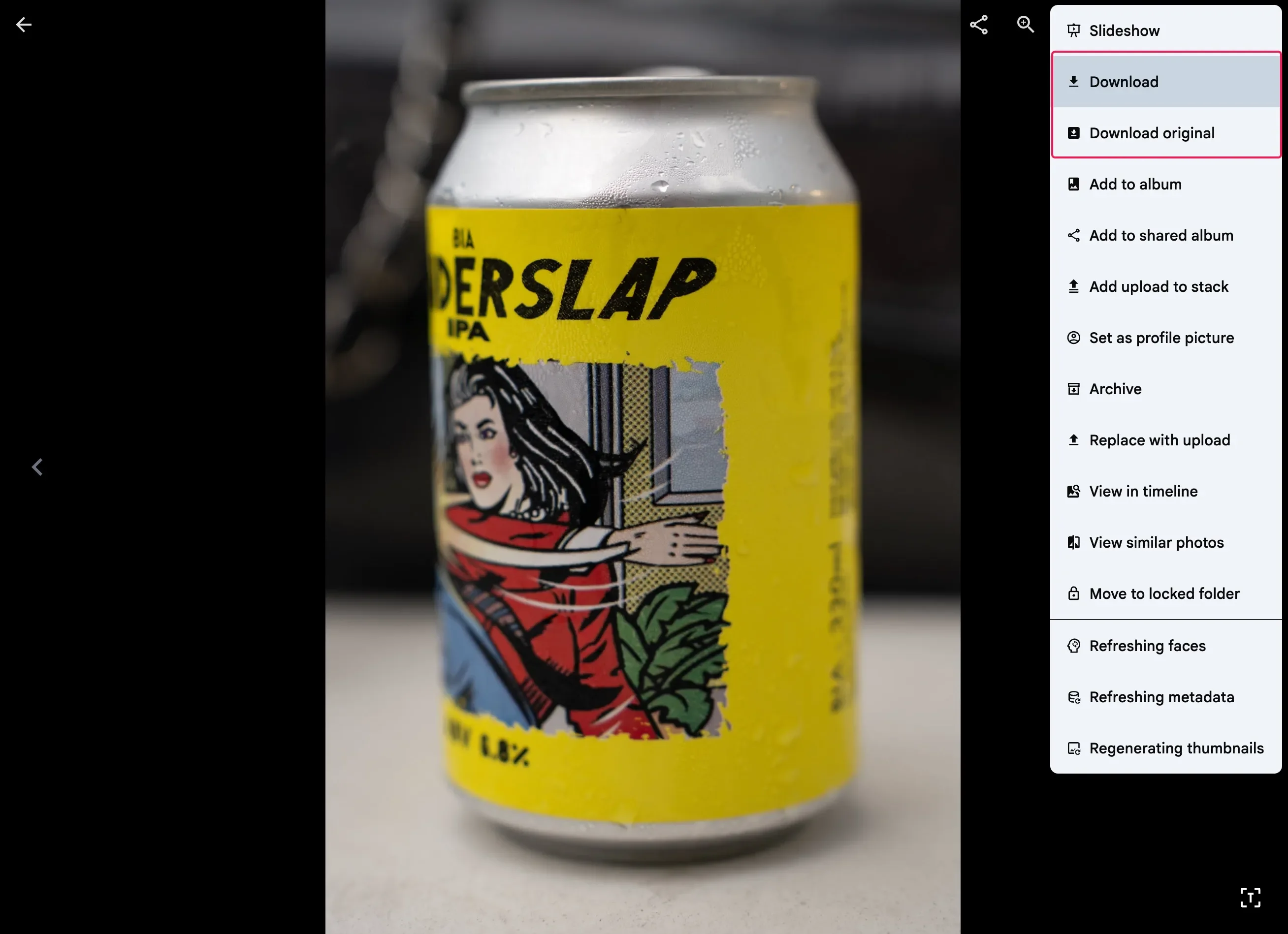
Immich now supports non-destructive photo editing. This means that any edits you make to an asset do not modify the original file; instead, the modifications are stored in the database, and new thumbnails are generated based on those changes. This means you can always revert to the original asset if needed.
When you download an edited asset, Immich provides the edited version by default. However, you can choose to download the original version if needed. Immich always generates an edited full-size version based on your full-size quality settings. This occurs regardless of whether the "Enable full-size image generation" setting is enabled or disabled.
You can click on the following icon to enter edit mode
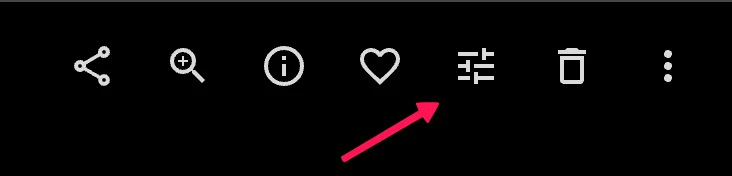
Currently, Immich supports the following types of edits:
- Cropping
- Rotation
- Mirroring
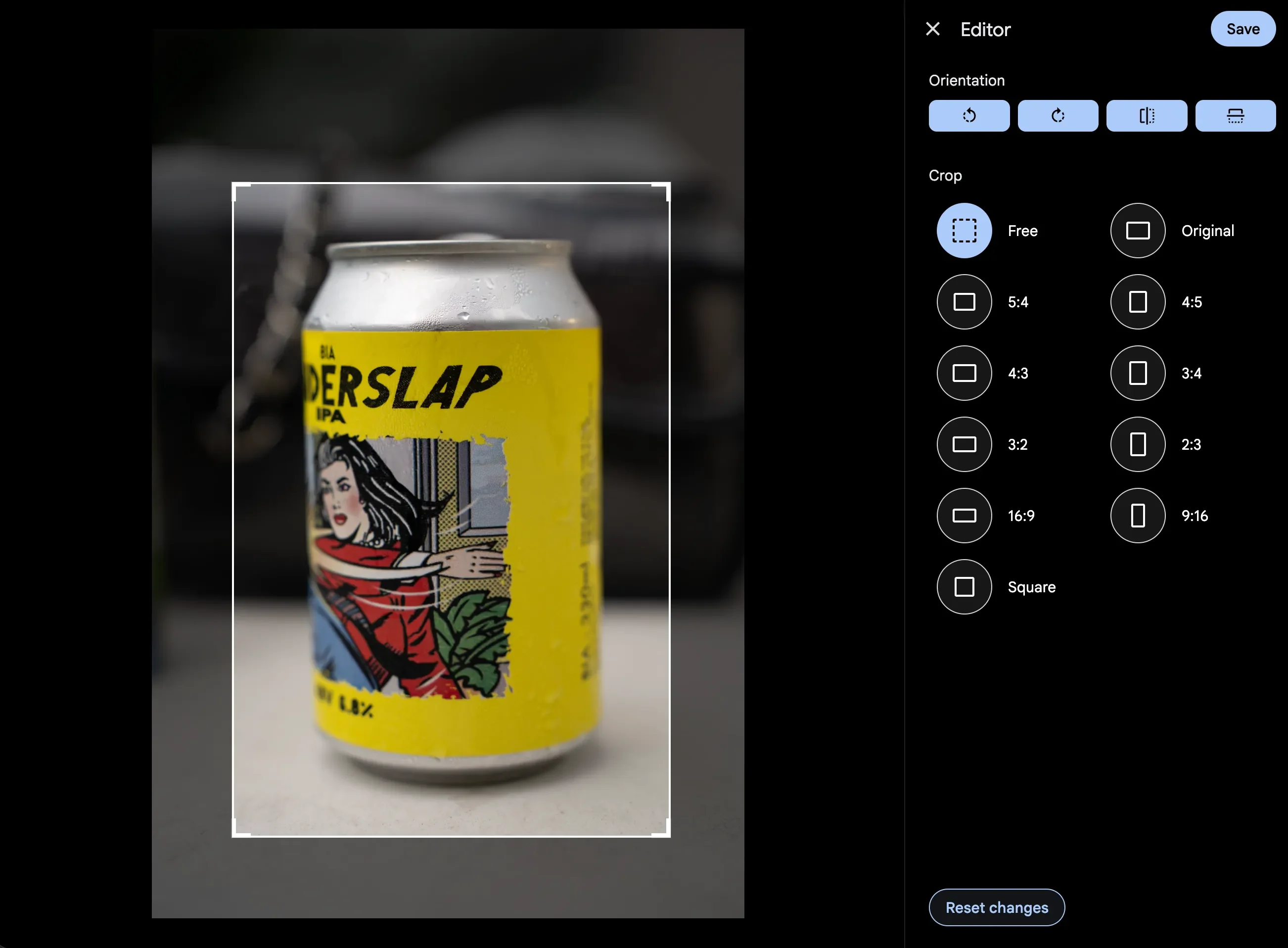
Opening the editor on an edited asset will load the existing edits back in so you can make adjustments and changes.
Backup and restore from the web UI
Backup and restore are an important part of any self-hosted application; this feature helps you maintain reliable access to your instance during unexpected events, such as database corruption caused by system failure or power loss.
Historically, restoring an Immich instance to a specific point required the user to have access to the command line, which proved challenging for many users, especially those new to self-hosting and software maintenance.
Now, we have the entire backup and restore pipeline built into Immich, which allows you to quickly restore a database backup directly from the web UI. You can perform the steps either from the Administration > Maintenance page, or from a brand new instance on the welcome page.
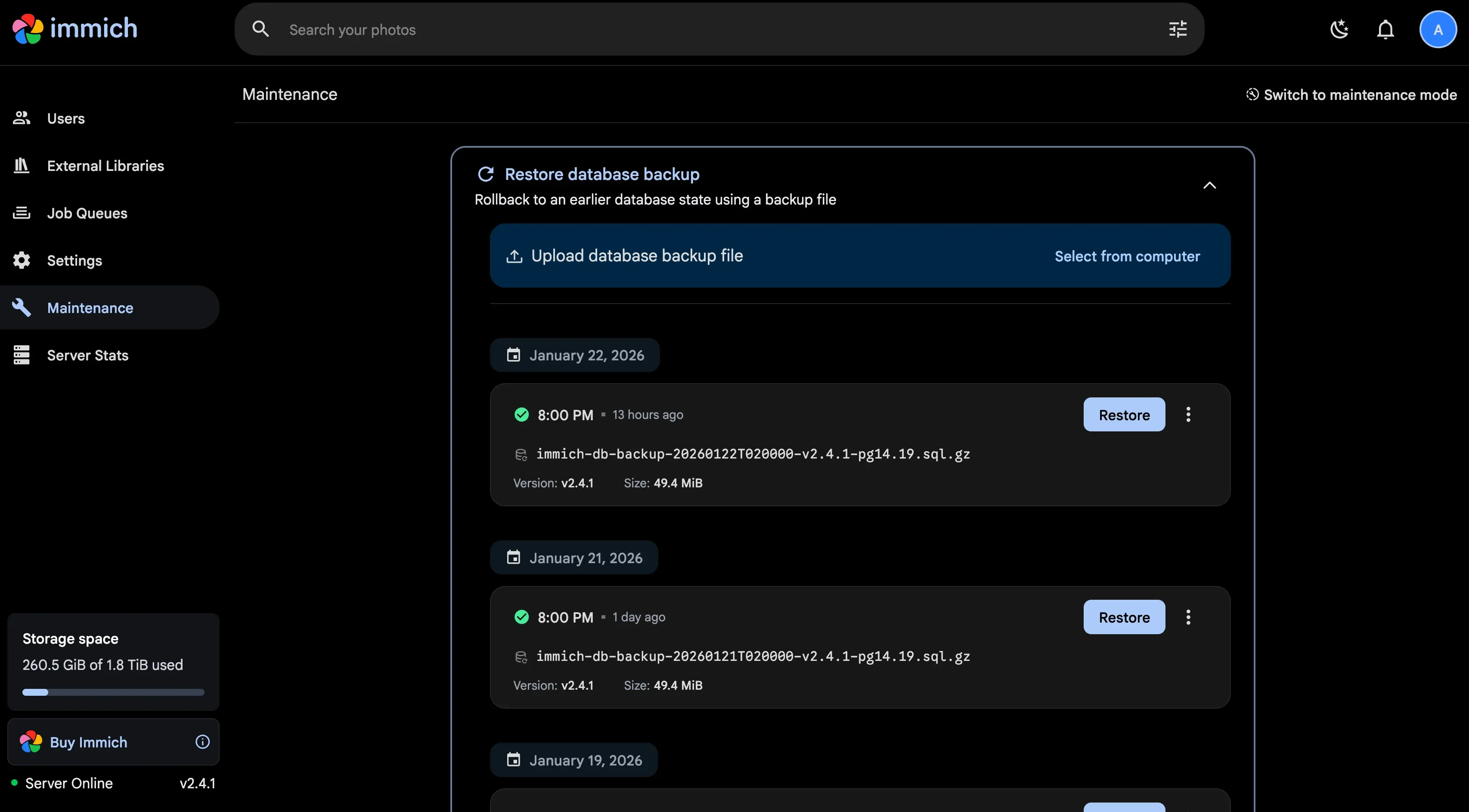
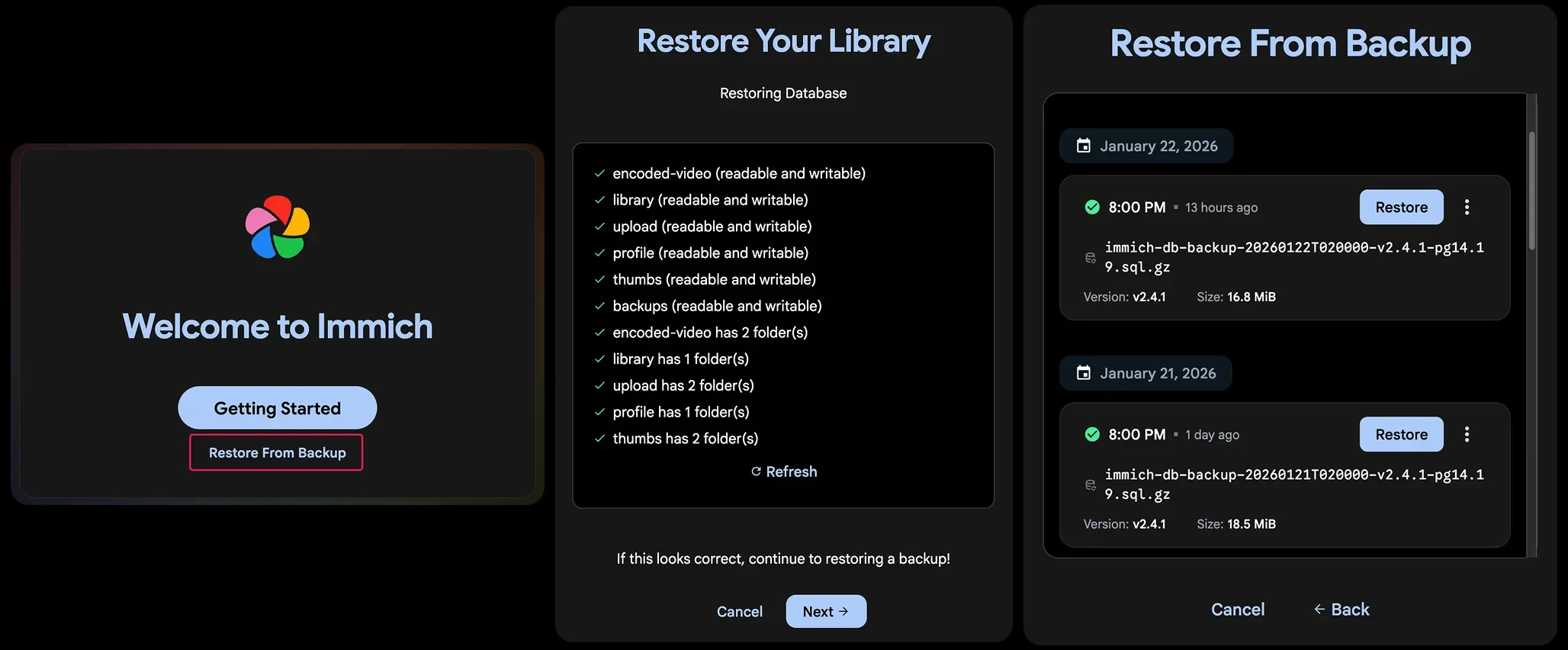
For more detailed steps, please read them in our documentation
Foreground upload improvement
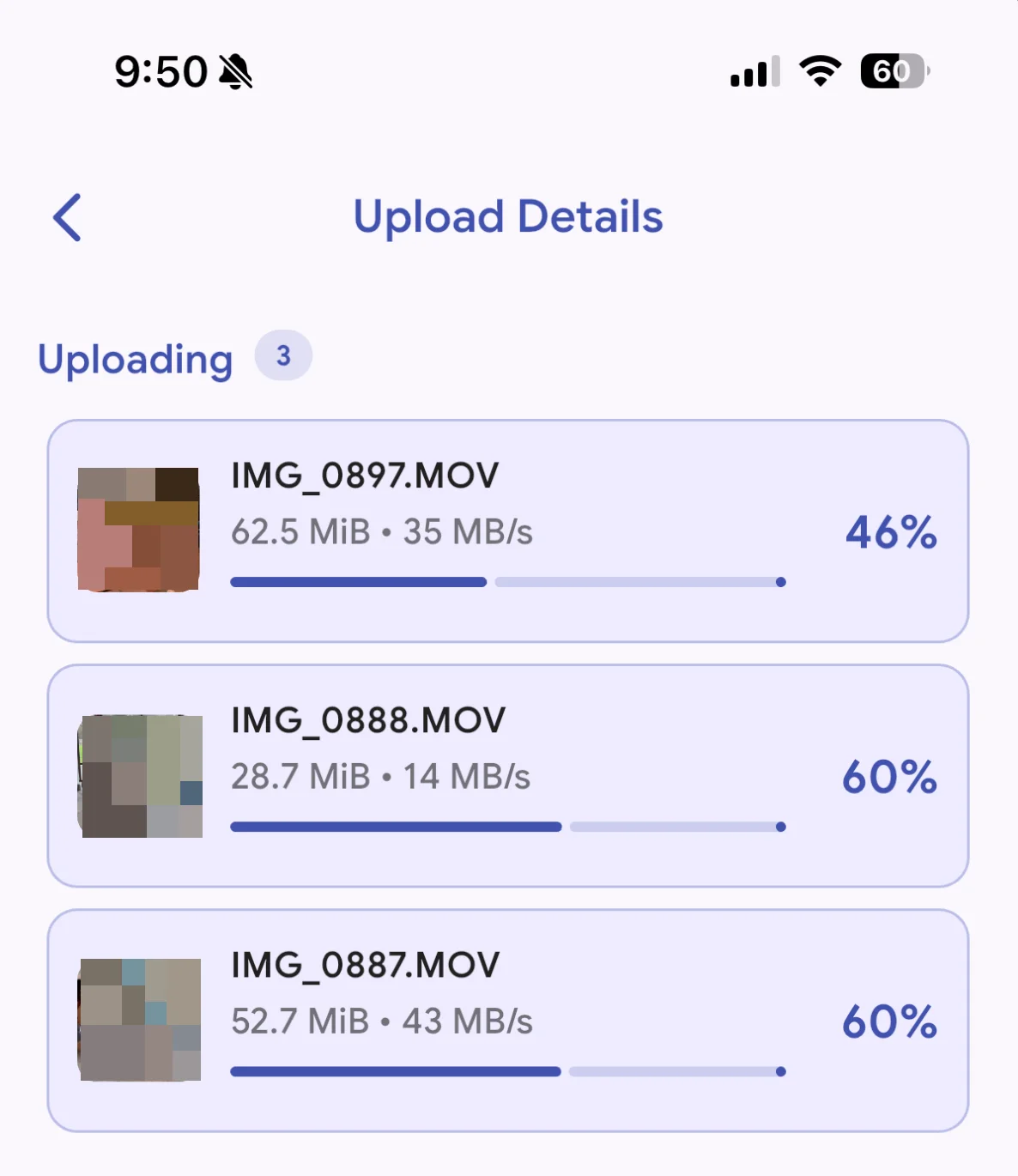
This release also improves foreground upload in the mobile app. The previous implementation improves background uploads but leaves foreground uploads less reliable by leveraging the queue system to offload upload handling to the OS, which can be throttled under specific criteria.
We are taking back more control over handling uploads with the try-and-true method used in the old timeline, but this time it is supercharged with concurrent uploads and also correctly handles assets with missing file extensions from software such as DJI or Fusion Camera.
Visual refresh across all platforms
This release also brings you a refreshed look and feel across the web, mobile app, and the documentation sites, with a new font face ("The-name-must-not-be-named" Sans) that improves reading legibility, especially for numbers and smaller text.
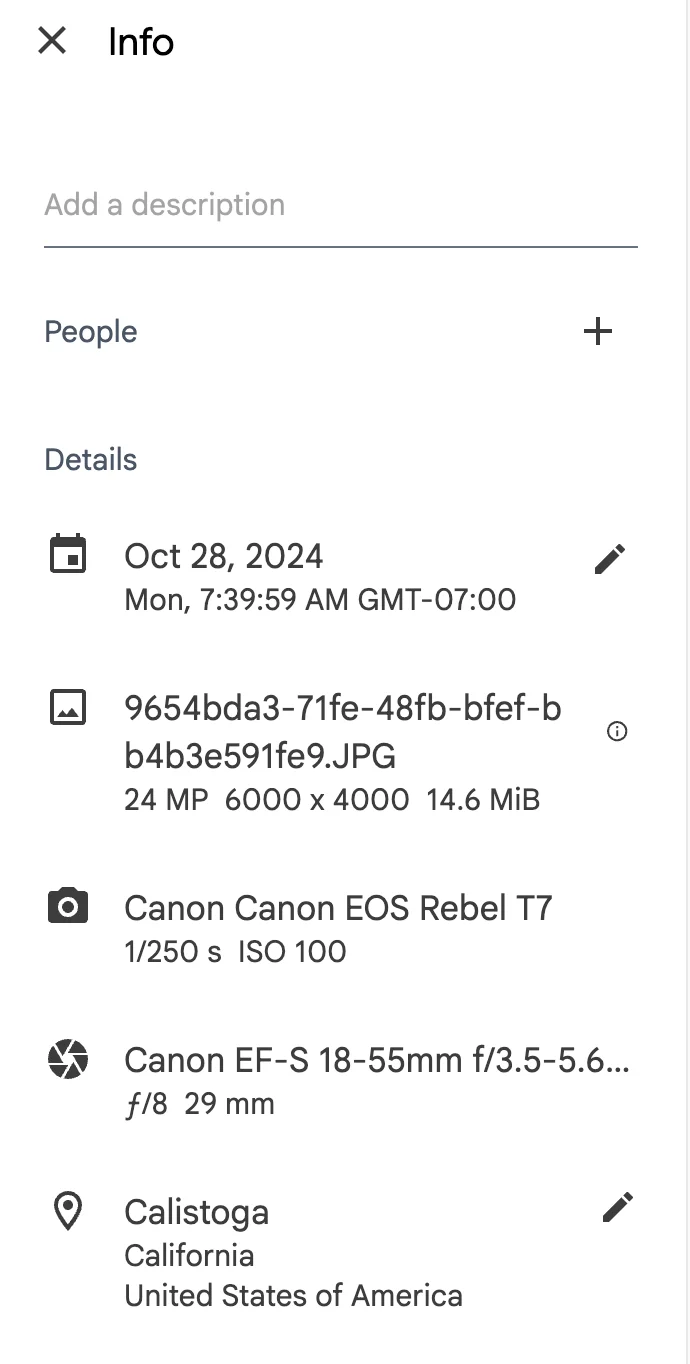
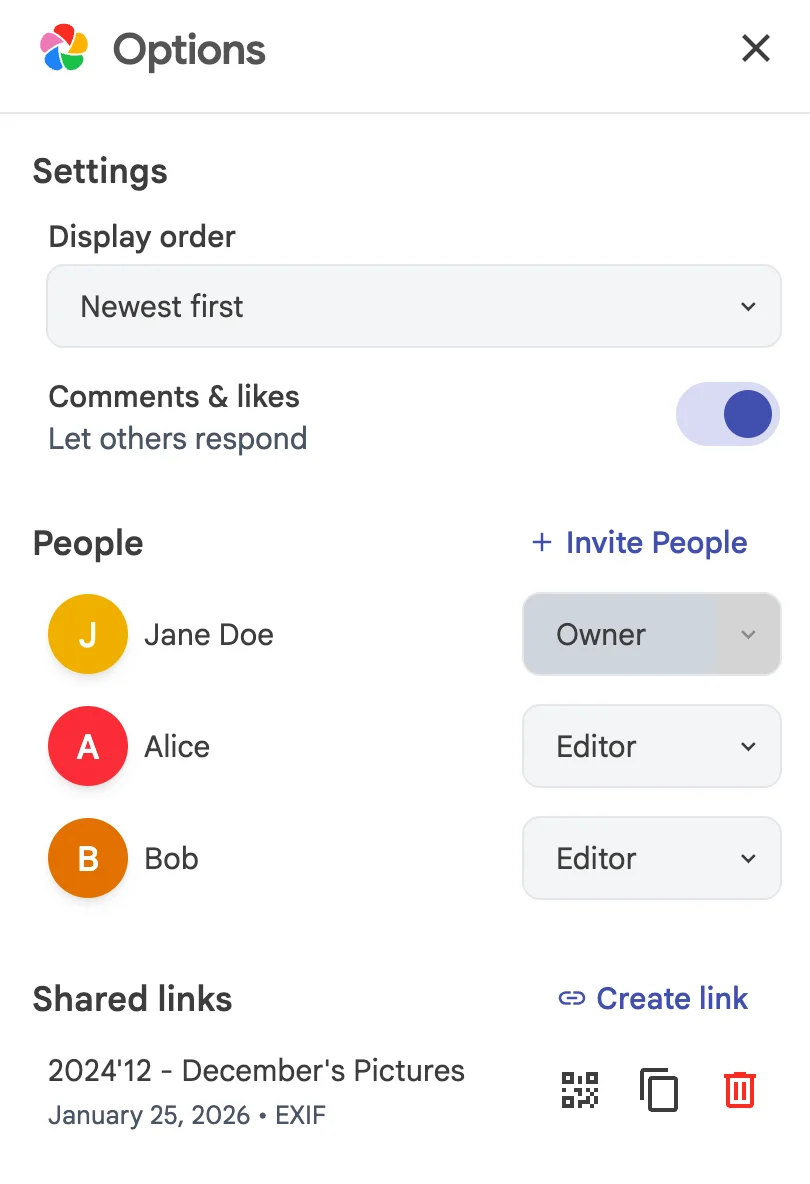
The UI library (https://ui.immich.app/) components have also been added to the web app in more places. You should see a more standardized, coherent, and better hierarchy for UI components across the app.
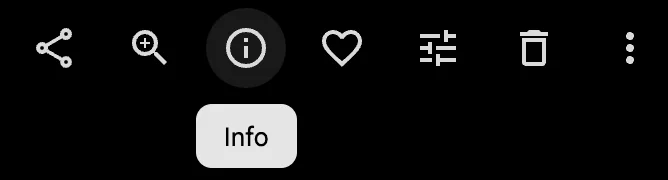
All icon buttons now come with a tooltip, so you don't have to guess what function the button serves
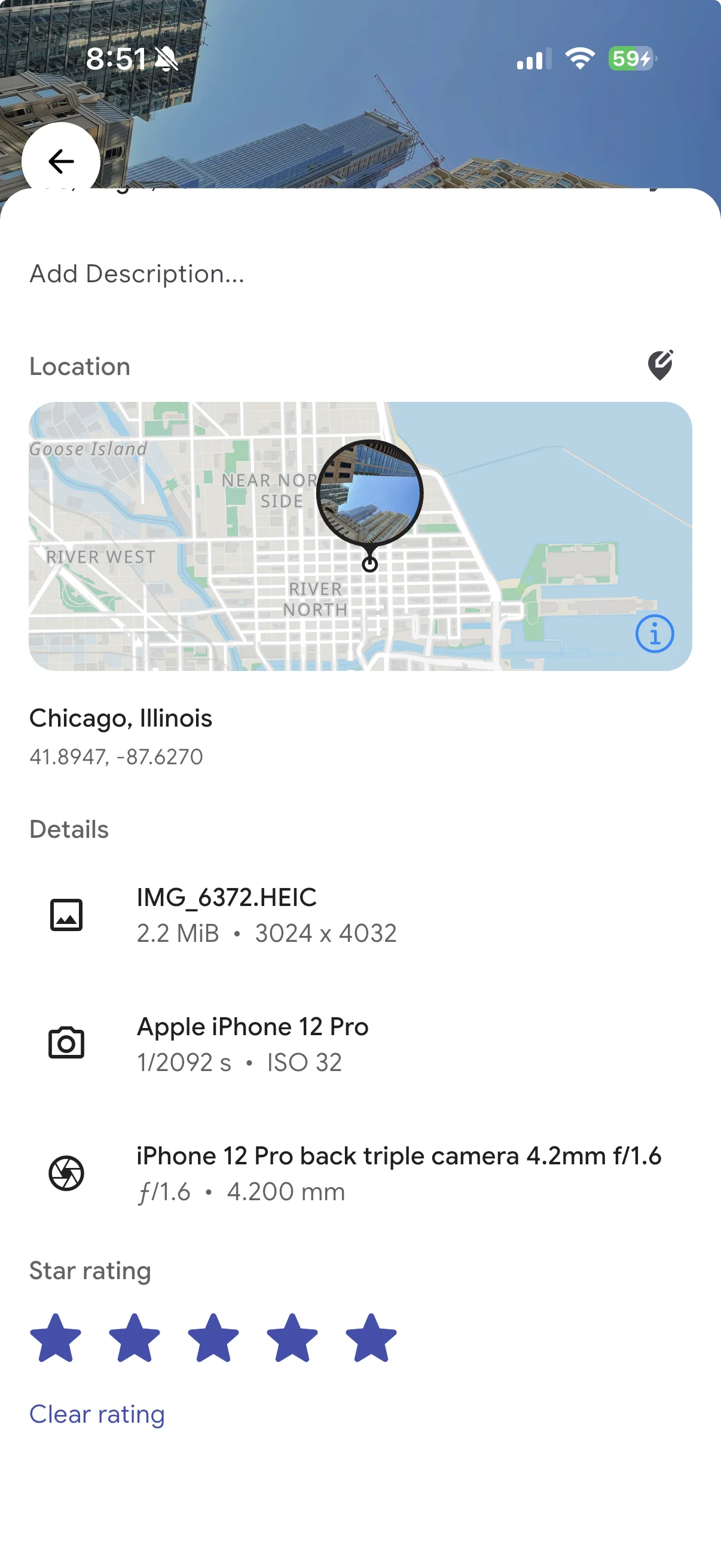
Star rating (mobile)
Mobile now has the star-rating feature, similar to the web application. If you don't see a star rating on either platform, make sure the feature is enabled here.
\
Disable admin setup
New installs show a welcome page and allow anyone to sign up / register as an admin. To have more control over whether this is allowed or not, we have added the following environment variable:
IMMICH_ALLOW_SETUP = true | false;This is especially useful if you have already initialized Immich and never want this situation to be possible in the future, which can happen if for whatever reason the database is reset.
Additional fine-grained permissions (api keys)
Some existing endpoints have been assigned fine-grained permissions, allowing the creation of API keys with limited access. The new permissions include:\n
-
map.read- Retrieve a list of latitude and longitude coordinates for every asset with location data -
map.search- Retrieve location information for latitude & longitude coordinates -
folder.read- Retrieve information about folders and which assets they contain
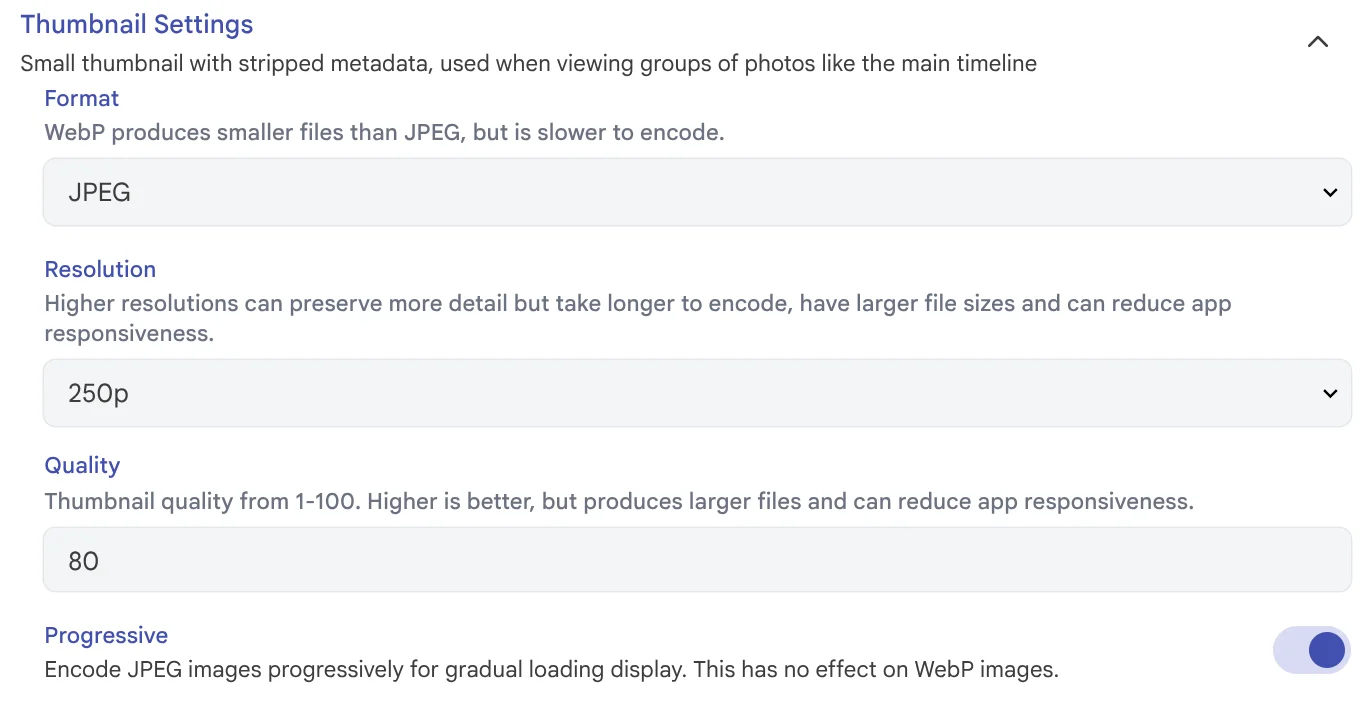
Progressive JPEGs
All image-generation settings now include a new option to enable progressive JPEGs. When enabled, supported browsers will progressively render the image.
Slideshow loop option (web)
The slideshow settings on the web now include an option to automatically start the slideshow over.

Native HTTP clients
On the mobile app, all remote images are now requested using optimized HTTP clients, meaning images load more quickly and can keep up with your scrolling. Caching is also improved: not only does this make images even snappier to load after being downloaded, but it also improves the offline experience with better responsiveness and a larger cache size.
What's Changed
🚀 Features
- feat: workflow ui by @alextran1502 in #24190
- feat: disable admin setup by @jrasm91 in #24628
- feat: free up space by @alextran1502 in #24999
- feat: use fastlane sigh to manage signing profiles by @alextran1502 in #25089
- feat: image editing by @bwees in #24155
- feat: add cloud id during native sync by @shenlong-tanwen in #20418
- feat: restore database backups by @insertish in #23978
- feat(mobile): star rating by @YarosMallorca in #24457
- feat(mobile): scrollbar for album page by @alextran1502 in #25507
🌟 Enhancements
- feat: focus jumped-to item in timeline by @bo0tzz in #24738
- chore: web editor improvements by @bwees in #25169
- feat: modal routes by @jrasm91 in #24726
- feat: prefer admin settings page over users page by @jrasm91 in #24780
- feat: shared link edit by @jrasm91 in #24783
- feat(mobile): use tabular figures in backup info card by @wrbl606 in #24820
- feat(mobile): album options to kebab menu by @idubnori in #24204
- feat: Hide/show controls when zoom state changes by @Lauritz-Tieste in #24784
- feat(server): Support camera
make,model, andlensModelin Storage Template by @rahul-kumar-saini in #24650 - feat(ml): update ONNX Runtime, OpenVINO and ROCm stack by @savely-krasovsky in #23458
- chore(server): Vchord 1.0 support by @mmomjian in #23845
- feat(web): Add coordinate pair location searching. by @GustavJones in #24799
- feat: show asset owners for editors in shared albums by @ama156 in #24890
- feat(web): undo delete single asset by @YarosMallorca in #24439
- feat(server): implement switchable logging formats (console/json) by @DanielRamosAcosta in #24791
- chore(web): bump immich/ui for tooltips by @jrasm91 in #24632
- feat(web): star rating keyboard shortcut by @cbochs in #24620
- feat: bulk asset metadata endpoints by @jrasm91 in #25133
- feat(mobile): 2026 font by @alextran1502 in #25213
- feat(web): search albums by description by @YarosMallorca in #25244
- feat(web): 2026 font by @alextran1502 in #25174
- chore: dart http foreground upload by @alextran1502 in #24883
- feat: update intel compute driver by @savely-krasovsky in #25259
- feat: download original asset by @danieldietzler in #25302
- feat: allow /memory?id= in AndroidManifest by @arne182 in #25373
- fix: add scoped API permissions to map endpoints by @meesfrensel in #25423
- fix(server): scoped permissions for more endpoints by @meesfrensel in #25452
- feat: generate progressive JPEGs for thumbnails by @midzelis in #25463
- feat: loop slideshows by @GeneralZero in #25462
- feat(mobile): native clients by @mertalev in #21459
🐛 Bug fixes
- fix(maintenance): prevent enable/disable maintenance CLI hanging on occasion by @insertish in #24713
- fix(web): display jxl original by @mertalev in #24766
- fix(web): stale album info by @jrasm91 in #24787
- fix: album card timezone by @danieldietzler in #24855
- fix(web): let slideshow videos play (#19601) by @keanucz in #24914
- fix(server): update exiftool-vendored to v34.3 for correct colon-less timezone parsing by @dosten in #24979
- fix(mobile): hide delete action for remote-only assets by @skrmc in #25010
- fix: import config from json by @MontejoJorge in #25030
- fix: search input has incorrect focus state after closing the search filter modal by @alextran1502 in #24886
- fix(web): duplicate key error and enable expiration editing for expired shared links by @timonrieger in #24686
- fix: shared-link-mapper by @jrasm91 in #24794
- fix(server): migrate motion part of live photo by @NikhilAlapati in #24688
- fix(web): use asset date for change date popup when single asset selected by @majiayu000 in #25076
- fix(web): long text taking more width than expected in duplicate manager by @HemendraSinghShekhawat in #24547
- fix(web): broken asset urls if shared link has photos in name by @YarosMallorca in #24451
- fix(server): search statistics with personIds returns 500 by @majiayu000 in #25074
- fix(web): server stats layout by @meesfrensel in #25085
- fix: enter now submits the date modals by @fabb in #25053
- fix(web): improve text contrast in minimized upload panel by @majiayu000 in #25075
- fix: propagate iCloud Shared Album flag by @alextran1502 in #25060
- fix: description does not rerender when navigating between assets by @alextran1502 in #25137
- fix(server): avoid upserting empty metadata array by @timonrieger in #25143
- fix(server): Document HTTP 200 response for duplicate uploads in OpenAPI by @timonrieger in #25148
- fix(web): person asset count doesn't update when navigating by @YarosMallorca in #24438
- fix(mobile): remove weird zooming behaviour on videos and play/pause button delay by @goalie2002 in #24006
- fix: unlock properties after successful sidecar write by @danieldietzler in #25168
- fix(web): show relevant navbar options for partner assets by @YarosMallorca in #24832
- fix(web): added background gradient for video time visibility by @HemendraSinghShekhawat in #25138
- feat(mobile): do not restore locally deleted assets during trash sync (Android) by @PeterOmbodi in #24218
- fix: asset local type casting by @alextran1502 in #25214
- fix(web): ocr button not clickable for stacked assets by @YarosMallorca in #25210
- fix(web): Handle upload failures from public users by @juliancarrivick in #24826
- fix(mobile): prevent system UI from hiding on drag down gesture by @goalie2002 in #25240
- fix: migration order by @jrasm91 in #25249
- fix(web): redirect to login by @jrasm91 in #25254
- fix(mobile): improve asset transition back to timeline by @goalie2002 in #24485
- fix: dark mode appbar color by @akashKarmakar02 in #24976
- fix(web): add min-width to setting input field by @K0lin in #25317
- fix(server): api key update checks by @jrasm91 in #25363
- fix(mobile): album selector icon visibility by @ByteSizedMarius in #25311
- fix(mobile): indicators not showing on thumbnail tile after asset change in viewer by @goalie2002 in #25297
- fix(web): handle deletion from asset viewer on map page by @meesfrensel in #25393
- fix: tag update race condition by @danieldietzler in #25371
- fix(web): allow exiting pin setup flow by @meesfrensel in #25413
- fix: upload file without extension by @alextran1502 in #25419
- fix: incorrect asset viewer scale on image frame update by @shenlong-tanwen in #25430
- fix(mobile): bring back map settings by @shenlong-tanwen in #25448
- fix(web): fix badge value in queues page by @beinganukul in #25445
- fix(mobile): backfill asset dimensions to exif table by @bwees in #25483
- fix(mobile): do not try to load video as image by @mertalev in #25495
📚 Documentation
- fix: product keys wording in commercial guidelines faq by @bo0tzz in #24765
- docs: config options for hardware transcoding by @Javex in #24853
- fix: use my.immich.app as url placeholder in docs by @bo0tzz in #25153
- chore: update Thai README (remove "under active development" lines) by @ppnplus in #25208
- fix(docs): add missing mermaid dependency and configuration by @bdoerfchen in #25247
- chore(docs): update RAM req by @mmomjian in #25344
- feat(docs): add Free Up Space section by @aviv926 in #25253
- docs: update README_de_DE.md by @solluh in #25443
- fix(docs): document that fullsize thumbnail might redirect to original by @meesfrensel in #25416
- docs: update documentation by @alextran1502 in #25440
New Contributors
- @wrbl606 made their first contribution in #24820
- @keanucz made their first contribution in #24914
- @rahul-kumar-saini made their first contribution in #24650
- @dosten made their first contribution in #24979
- @GustavJones made their first contribution in #24799
- @skrmc made their first contribution in #25010
- @ama156 made their first contribution in #24890
- @DanielRamosAcosta made their first contribution in #24791
- @NikhilAlapati made their first contribution in #24688
- @flpcury made their first contribution in #24867
- @Javex made their first contribution in #24853
- @majiayu000 made their first contribution in #25076
- @HemendraSinghShekhawat made their first contribution in #24547
- @cbochs made their first contribution in #24620
- @fabb made their first contribution in #25053
- @ppnplus made their first contribution in #25208
- @juliancarrivick made their first contribution in #24826
- @bdoerfchen made their first contribution in #25247
- @akashKarmakar02 made their first contribution in #24976
- @K0lin made their first contribution in #25317
- @NAM-MAN made their first contribution in #25320
- @ByteSizedMarius made their first contribution in #25311
- @arne182 made their first contribution in #25373
- @solluh made their first contribution in #25443
- @beinganukul made their first contribution in #25445
- @GeneralZero made their first contribution in #25462
Full Changelog: https://github.com/immich-app/immich/compare/v2.4.1...v2.5.0
Cheers,
The Immich Team